What can I learn in the demo?
Start with the stake selector, Build and Cashout. Then watch bonus progress and explore the ten-drop sequence, partial cashout and the paid bonus controls. Our screenshot guide explains each option with examples.
Try Tower Rush 2 directly at Galaxsys. Choose the desktop or mobile demo, learn the controls and explore Triple Build, the ten-drop Bonus Round and 50% Cashout before playing for money.
Play Tower Rush 2 now in Galaxsys’s official demo. Use the desktop link for a larger game screen or the mobile link to try the layout on your phone. The provider shows an age confirmation before its player. Once it opens, begin with a normal tower: choose a stake, press Build and compare the result after each successful floor.
Both links lead directly to Galaxsys. Access to the player may depend on age and location.
Find Build and Cashout beneath the tower, then watch the progress bar on the left. Try collecting the full result in a normal round. If you reach 3×, look for 50% Cashout and see how the split works. Buy Bonus and Double Chance sit beside the betting controls; our feature guide explains their costs before you use them.
Every feature in screenshots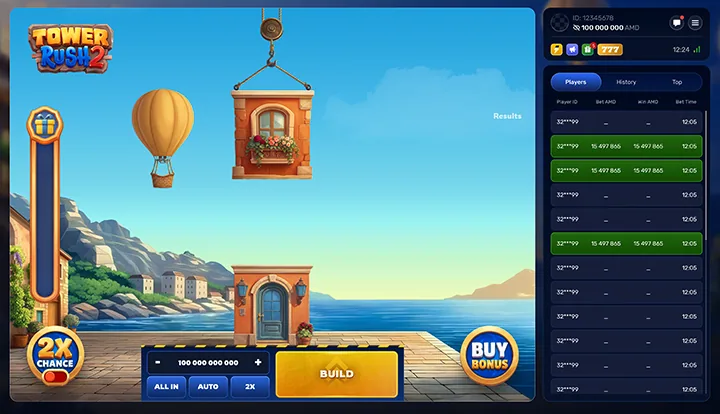
Open the mobile demo directly in your phone’s browser. There is no separate Tower Rush 2 download needed for the provider player. Start with the default view, find the stake controls and learn the Build-and-Cashout flow before exploring the bonus buttons. If you use a casino app instead, choose the download from the operator’s own site and find the Galaxsys title in its lobby.
For your next step, compare the casino’s payment options, withdrawal terms and game library. The demo teaches the controls; our casino guide helps you choose what to look for at an operator.
Where to play Tower Rush 2Start with the stake selector, Build and Cashout. Then watch bonus progress and explore the ten-drop sequence, partial cashout and the paid bonus controls. Our screenshot guide explains each option with examples.
The Galaxsys mobile demo runs through a browser, so a separate app is unnecessary for that player. A casino may also offer its own app; use the operator’s official download if you choose that route.
The feature guide shows all eight options with screenshots, trigger conditions and cost examples. Open the in-game information panel too, so you can match each explanation to the player.